
SerpCraft: A Human-in-the-Loop AI SEO Content Writing Agent
Tools
TL;DR
Most AI writing tools either hand you a finished wall of text with no visibility into the sources, or run a fully autonomous pipeline that quietly produces generic SEO sludge. SerpCraft SEO Writer takes a different path: an 11-state pipeline with 4 explicit human gates, grounded in real SERP data, where you can edit anything the model produces in the browser before it moves on.
- 11 states, 4 of them human gates (review, URL selection, brief, article)
- 7 custom tools for SERP, rendering, extraction, summarization, brief, article, persistence
- 2,000+ lines of Python (state machine, tools, web app)
- Real LLM integration via Ollama Cloud (qwen3.5:397b-cloud, minimax-m3)
- Every run persisted to disk for audit and re-run
- Built as a local web app (FastAPI + Jinja2)
The problem
I was tired of two failure modes in AI content tools:
1. The black box. A tool that takes your keyword and returns 2,000 words in 30 seconds, with no way to see what it actually read, no way to course-correct until you're deep into the output, and no audit trail for what it produced.
2. The autonomous pipeline. A tool that scrapes, writes, and publishes without you. The first time you read the output, you find it's averaged the SERP into a generic "ultimate guide" and missed the angle you actually wanted.
Both of these feel productive in the moment and produce bad content in the long run.
What I wanted was a tool that lets me see what it's reading, lets me reject bad inputs early, and lets me edit the output at every stage.
The design: an 11-state pipeline with 4 human gates
SerpCraft is a state machine. The walk from keyword to article is broken into 11 discrete states, and 4 of those states are human gates where the agent stops and waits for me.
| State | What happens | Type |
| S0 | I provide primary keyword, secondaries, location, language, and tone | human |
| S1 | Serper.dev fetches top results for primary + each secondary | auto |
| S2 | Playwright renders each unique URL with a real headless browser | auto |
| S3 | Structured stats per page (word count, links, headings, images) | auto |
| S4B | I see every page with its stats, deselect any I don't want summarized | gate 0 |
| S4 | LLM produces a 2-3 sentence summary per kept page | auto |
| S5 | I pick which references to use for the brief | gate 1 |
| S6 | LLM produces a 13-section content brief | auto |
| S7 | I read the brief, edit the markdown, or send back for revision | gate 2 |
| S8 | LLM writes the full article from the brief | auto |
| S9 | I read the article, edit it, ask for a full revision, or regenerate one H2 section | gate 3 |
| S10 | Run complete. Download links live. | terminal |
Why 4 gates? Because the cost of a wrong turn at gate 0 is 10 seconds of clicking. The cost of a wrong turn at gate 3 is regenerating a 2,000-word article. The earlier I can say "no, that page was bad", the cheaper the whole run becomes.
The cost of adding a gate is one extra click on my part. The cost of NOT having the gate is a 30-minute do-over. Gates are cheap.
The engineering: how it's built
State machine and tools
The pipeline is implemented as a state machine in agent.py with one function per state transition. The Run object carries inputs, history, and artifacts between transitions. Every transition is persisted to disk as a JSON line in history.json, so the run is fully replayable from any point.
The 7 custom tools are independent and loosely coupled:
- T1: Serper — wraps the Serper.dev API with a fixture fallback for offline testing
- T2: Render — Playwright headless browser, serial rendering, one shared instance per run
- T3: Extract — BeautifulSoup-based structured extractor that computes word count, internal/external links, headings, images, tables, lists, and primary keyword occurrences
- T4: Brief — 13-section brief builder with computed targets (median word count from the selected references, with an 800-word floor)
- T5: Article — article writer that follows the brief outline 1:1, with a META_DESCRIPTION extraction and a per-section regeneration protocol
- T6: Store — atomic JSON I/O for every artifact, with a per-run directory layout
- T7: Heartbeat — a context manager that writes a heartbeat file every 2 seconds during long LLM calls so the UI can show a spinner with elapsed time
LLM integration
The LLM client is a thin wrapper around Ollama Cloud's /api/chat endpoint, with a single chokepoint that handles:
- Model routing (per-call model override, default from config.yaml)
- Retries with exponential backoff (3 attempts, 1s/2s/4s)
- 300-second timeout (sized for qwen3.5:397b cold starts)
- Token usage tracking (prompt + eval tokens per call)
- A SEO_WRITER_MOCK_LLM=1 env var that swaps the client for a canned-responses module for UI development and CI
One detail that took some debugging: qwen3.5:397b-cloud is a "thinking" model that emits an internal message.thinking field with chain-of-thought reasoning. On a long prompt, the thinking alone can exceed the model's max_tokens budget, leaving message.content empty. The fix was a one-line change to the payload: "think": false. I now record this in the README's troubleshooting section so future-me doesn't have to rediscover it.
Web app
The UI is a FastAPI app with 8 Jinja2 templates and a small amount of vanilla JavaScript. Each human gate has its own template (review, select-urls, brief, article) with the controls specific to that gate. A 2-second auto-refresh poller re-renders the history table and the working block while the state machine is in an automatic state, then stops when we reach a gate.
Three JS files, deliberately small:
- app.js — common client logic (CTA handlers, state pill updates)
- article.js — the article page only (tab switch, debounced live stats, section regeneration form)
- styles.css — base styles, plus the per-page layouts
I kept the JS tiny because the heavy lifting is on the server. The server already has the full state, the history, and the artifact list; the client just polls and re-renders.
Edge cases I had to solve
Building a real pipeline means hitting real edge cases. A few of the more interesting ones:
Empty summaries from the LLM. My first run came back with "successfully generated 29 summaries" but the summaries were empty strings. The model returned 200 OK with message.content="" because all the output tokens went to the internal message.thinking field. I caught this in the summary tool by treating empty responses as failures and added "think": false to the payload to fix the root cause. The empty-response check stayed as a safety net.
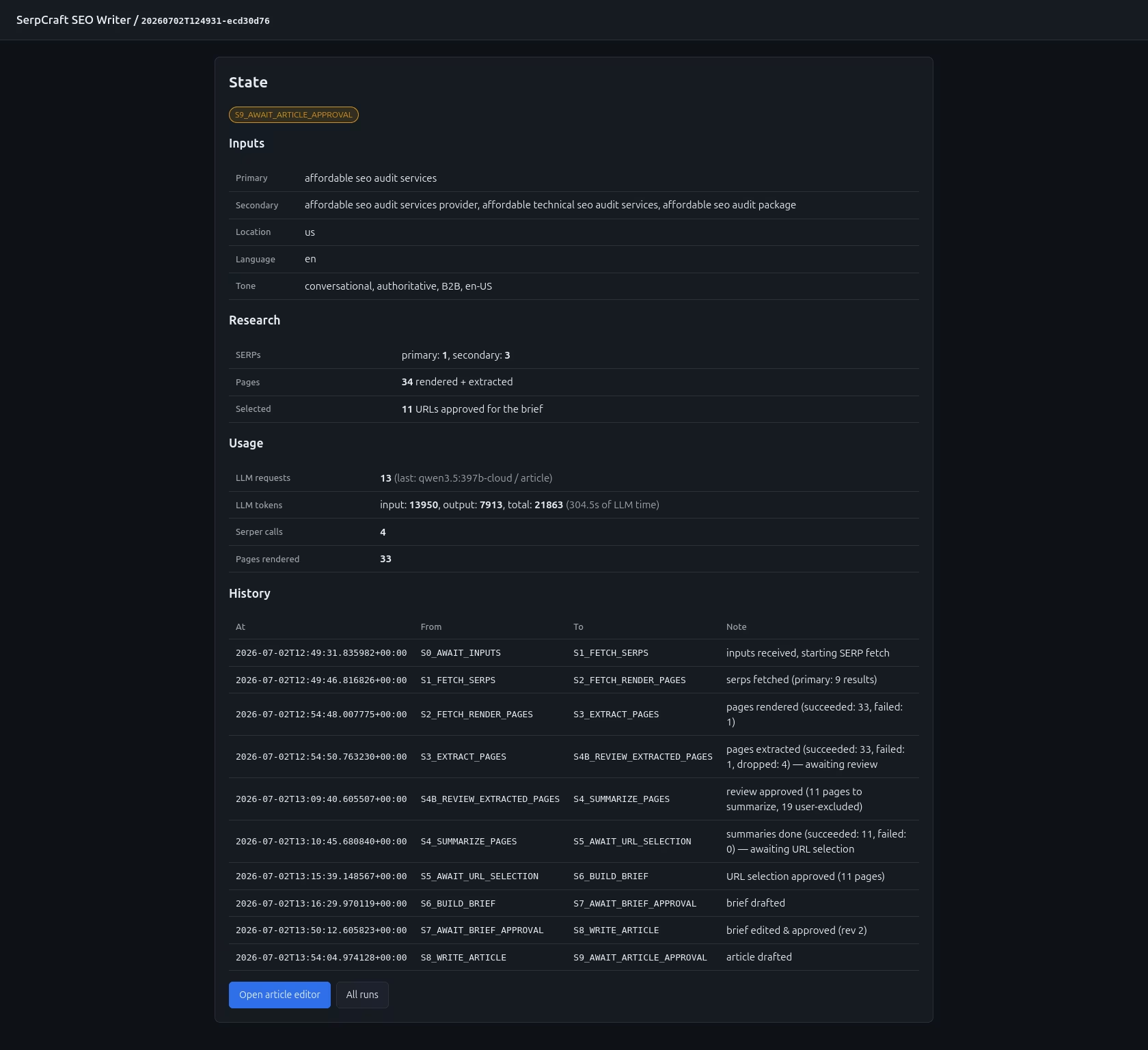
The state page looked frozen during long LLM calls. A 397B model call can take 60-180 seconds. The state page rendered "Working..." and then nothing. I added a heartbeat context manager that writes a file every 2 seconds, and a 1-second poller on the state page that shows the elapsed time. Long calls now feel live.
The history table didn't update during S4 (summarization). The state machine walked S1→S2→S3→S4 in a single call to run_until_gate, and only persisted the state machine history at the very end. I added an on_page_done callback to the summarize tool that updates the run's artifacts and persists after every single page. Now the history table ticks up as each page is summarized.
Bad SERP results that look valid. Some SERP results are soft-404 pages with a real <title> but no body content. Other results are URLs that Playwright can't load at all. I added a quality filter at S3 that drops pages with 0 word count or no title, and a separate path for failed renders. If every page gets dropped, the run halts with a clear error rather than producing a brief from no data.
A user typo'd the run ID in the URL and the page 404'd. The heartbeat endpoint was returning 404 for any run that didn't have a manifest, which made sense but felt brittle. I changed it to return {"active": false} for empty/missing runs, so the UI just hides the spinner instead of erroring.
How the user experiences it
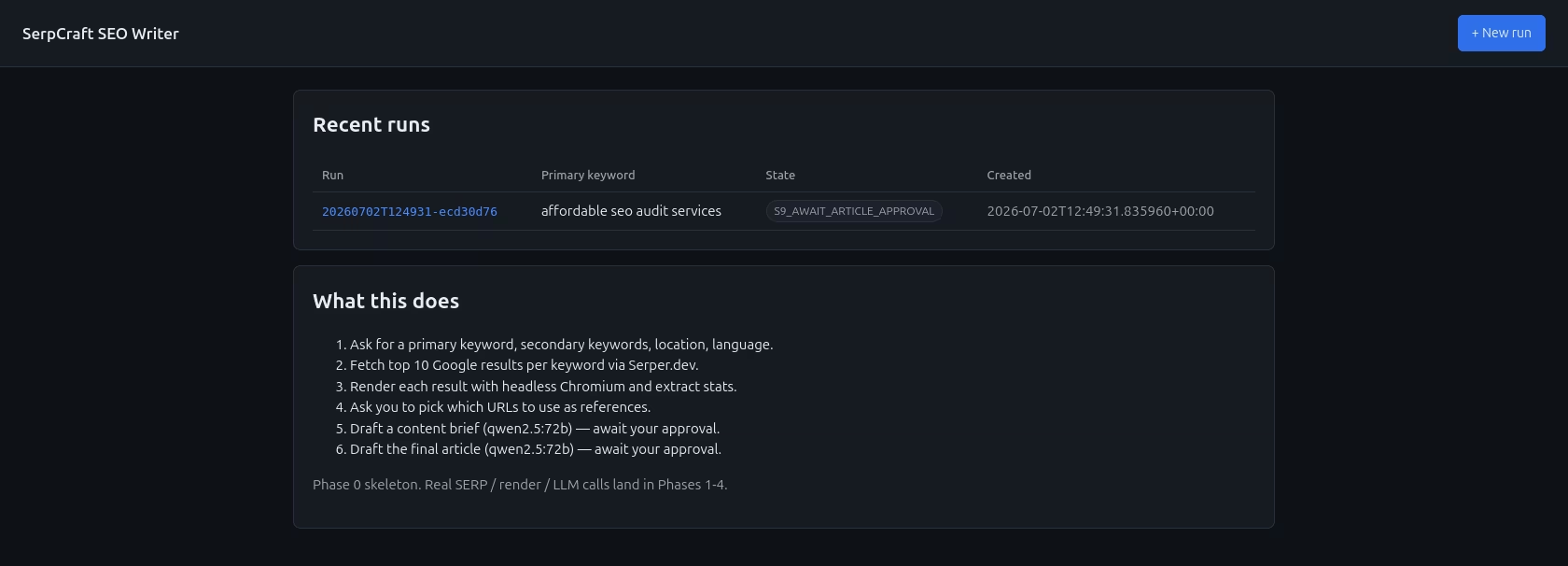
The web app is a single page that progresses through the pipeline. From a user's perspective:
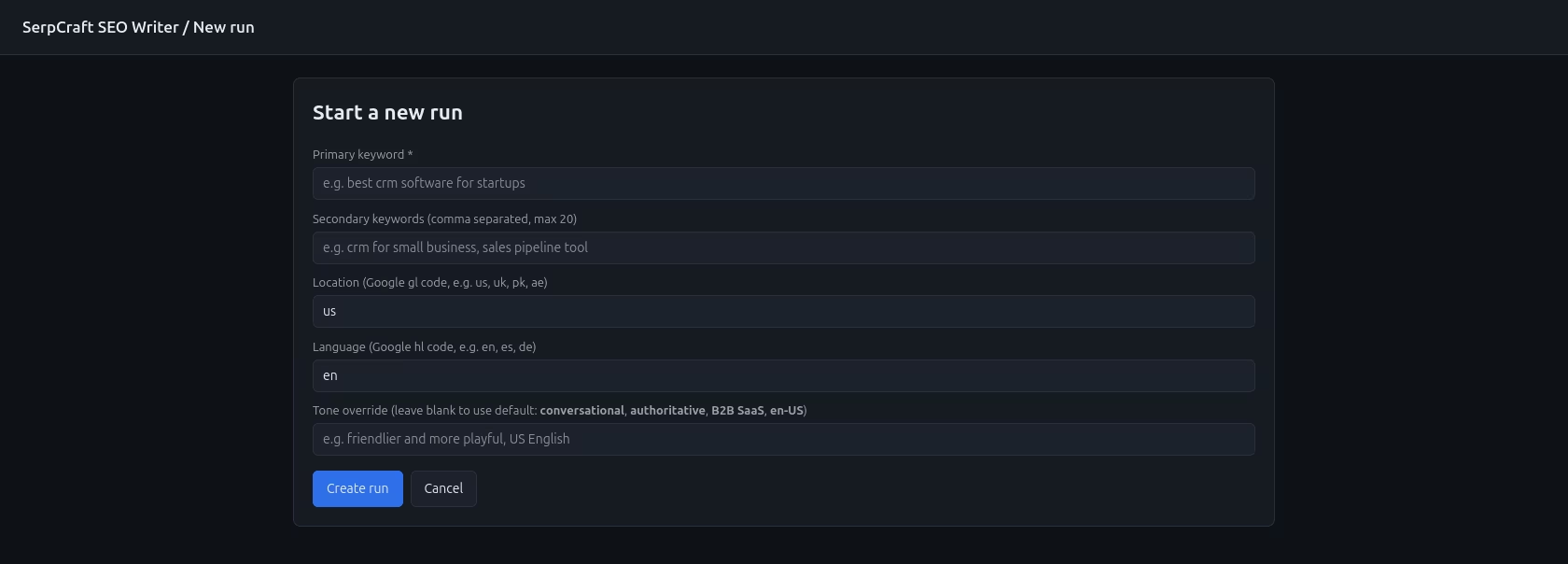
- Fill in a form: primary keyword, 1-20 secondary keywords, location, language, optional tone override. Click "Create".
- The state machine walks S1-S3 automatically. The state page shows a live counter ("rendering pages: 5/13") and a thin progress bar.
- At S4B (a gate I added recently), a page shows every extracted page with its stats. I can deselect the ones I don't want summarized. Two buttons: "Approve & start summarizing" or "Skip summarization".
- At S5, a checklist of summaries. I pick the references I want to use.
- At S7, a two-pane editor: rendered markdown on the left, raw markdown on the right. I can edit, ask for a full revision, or approve as-is.
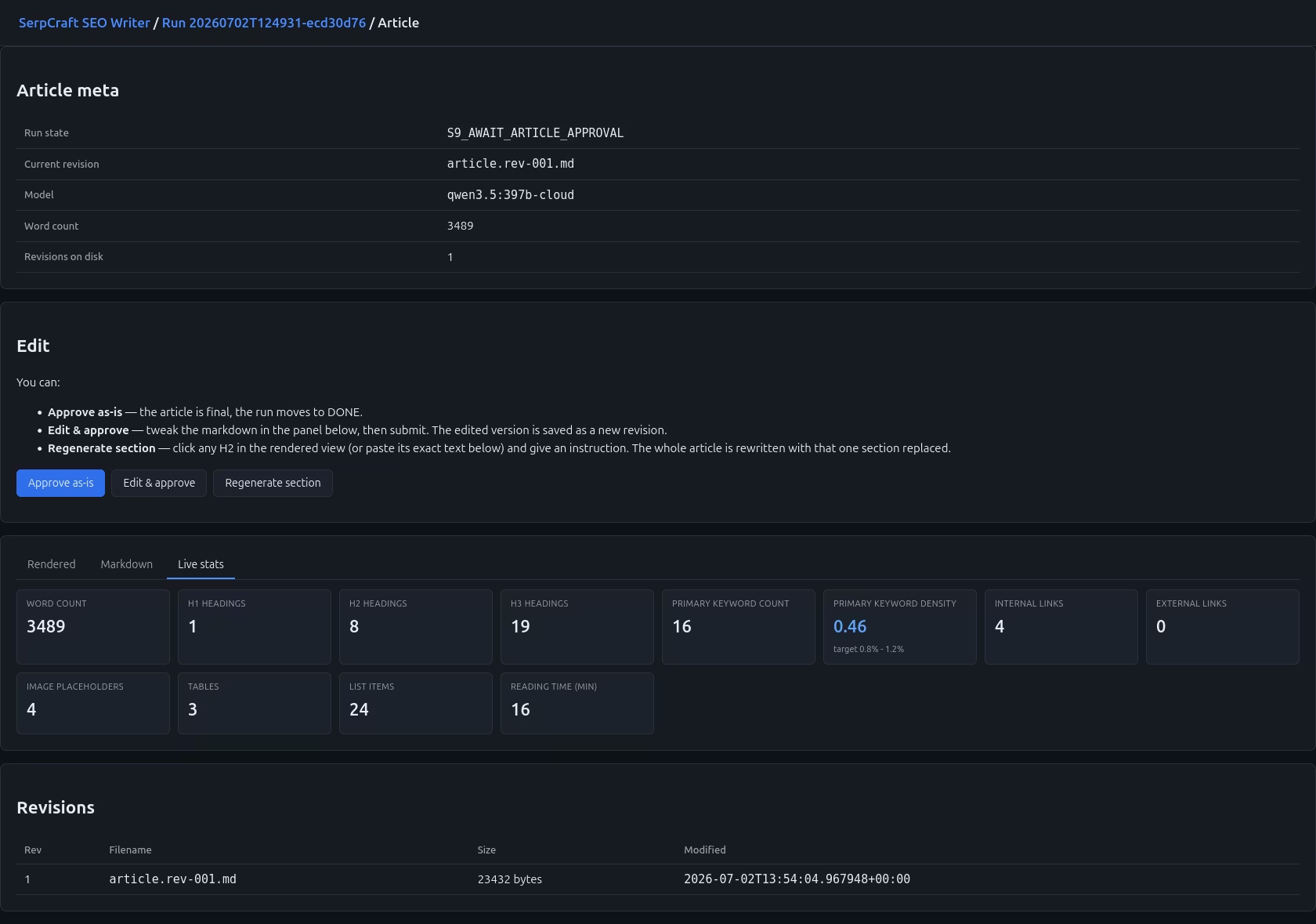
- At S9, a three-tab article editor: rendered view, raw markdown, and live stats. The stats show my counts in red/yellow/green against the brief's computed targets.
- At S10, a "Run complete" panel with download links for the brief and the article, plus a "Start a new run" button.
The whole experience is designed to be interruptible. At any gate, I can step away, come back hours later, and pick up where I left off. The state is on disk, the URL works, and the history is intact.
What I learned
Human-in-the-loop is not a feature. It's a philosophy. Once you commit to it, every design decision gets easier: the right place to add the next gate is always obvious, the right amount of automation is "everything between gates, nothing at gates", the right level of error handling is "show the user the error, don't auto-retry".
File-based state is the right level of abstraction for small projects. Every transition writes a JSON file. There is no database. The runs directory is the database. This made the resume-from-state story trivial and made it possible to build tooling like python -m tools.re_extract <run_id> that can re-run S3 on any historical run without touching the rest of the pipeline.
Real SERP data beats a knowledge base. The brief is grounded in what is actually ranking today for the keyword, not in what a model remembers from training. This is a real difference for long-tail keywords where the model's training data is sparse.
Long LLM calls need observable progress. A 5-minute "writing article..." spinner that just spins is worse than nothing. A 5-minute spinner that shows "writing article... 67s elapsed" feels live. The cost of adding the heartbeat was ~30 lines of code. The benefit is that the tool feels responsive even when the model isn't.
The model behavior is a moving target. The first qwen3.5:397b-cloud call I made returned an empty string because the model spent all the output tokens on internal reasoning. The same model, same prompt, same code, six months from now might do something different. Build the defenses (empty-response check, retries, mock mode for testing) and assume the model will surprise you again.
Tech stack
- Language: Python 3.11
- Web framework: FastAPI + Uvicorn
- Templates: Jinja2
- HTTP client: httpx
- HTML parsing: BeautifulSoup4 + lxml
- Browser automation: Playwright (headless Chromium)
- SERP API: Serper.dev
- LLM: Ollama Cloud (qwen3.5:397b-cloud for content, minimax-m3 for chat)
- State persistence: Plain JSON files on disk
- Configuration: YAML
- Virtual env: uv (with pip/venv as fallback)
Project structure
Running it
License: MIT. See the repo.